Devops for the .Net Platform
Continuous Integration and Continuous Deployment is simple and easy for small simple single developer projects directly from the Visual Studio IDE. But when it comes to large complex enterprise grade projects that are following an agile methodology Continuous Integration and Continuous Deployment become a complex task by itself.

But why use a Build Server?
Machine independence.
Scripted Builds.
Scripted tests.
Daily and Weekly builds.
Continuous Integration.
Automated releases.
Building in multiple environments.
Static and Dynamic Analysis.
This is where a Devops Team / Process comes into play it allows the development / product team to concentrate on their core skills which is design / code / writing test cases / bug fixes and committing their code to the Source Code Repository and not having to worry about the build / automation testing / deployment.

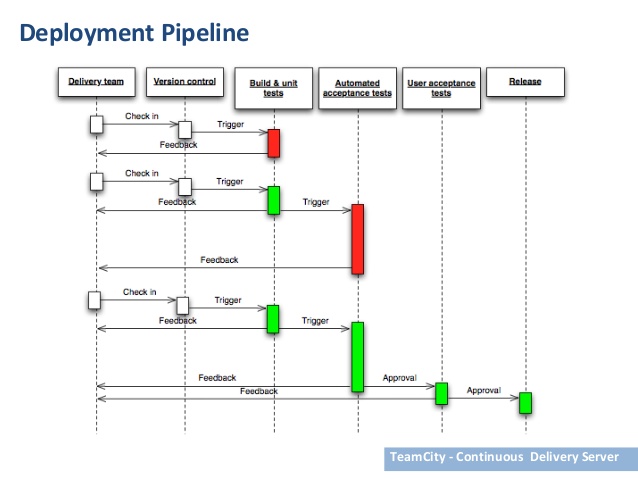
My personal preference is to use TeamCity as the Build / Deployment Server. It integrates well with the .NET environment, Windows and the Visual Studio IDE. It has a host of plugins that integrate the Build Server with the Windows environment and the Visual Studio IDE. It notifies the developer and the team that is configured to receive updates and alerts on success or failures of the Build Server not only through emails but right in their windows environment or Visual Studio IDE.
TeamCity integrates well with TFS / VSTS and other popular repositories like Git. GitHub, BitBucket, etc.
While this may look like an endorsement for TeamCity over other Build Servers I promise you it is not I have not affiliation to TeamCity. This is totally based on experiences setting up and running devops for .NET projects. The integration is a lot more closely coupled and easier to manage.
The ability to manage Nuget Packages for the project on a whole and have it as a dependency for the whole project. The ability to have separate build tasks for sub projects or components and have them all linked in the order of dependency can be visually managed and made to build in that order. Multiple build agents across multiple VM’s or physical servers and run build tasks concurrently. All the dependencies can be collated and the final build and deployment can be run.
All build errors will trigger alerts to the configured list of users. TeamCity integrates well with Jira so that your agile user stories are integrated into your development and build. It has an inbuilt NUnit test runner. There are many important .NET tools integrated and included with TeamCity, such as code coverage analysis, several .NET testing frameworks, and static code analysis.
At Santriya Technologies, we offer a variety of services to build identity, empower life style for our customers like small, medium and enterprise businesses across the globe. We have a pool of people with expert skills on any various technologies, open source technologies and database systems. We can help your company to overcome business challenges by building custom-made IT solutions.
Do your business need assessment of business process; feel free to contact Santriya Technologies to request free consultation 02087315286…